The Manifest V2 era is over: Chrome removes AdGuard Ad Blocker MV2 from the Web Store
It’s official. The Chrome Web Store has notified us that AdGuard Ad Blocker MV2 — the version of our extension built on Manifest V2, Chrome’s previous platform for browser extensions — has been removed. The notice leaves no room for ambiguity. Violations: none. Reason: “Manifest V2 Deprecation.”
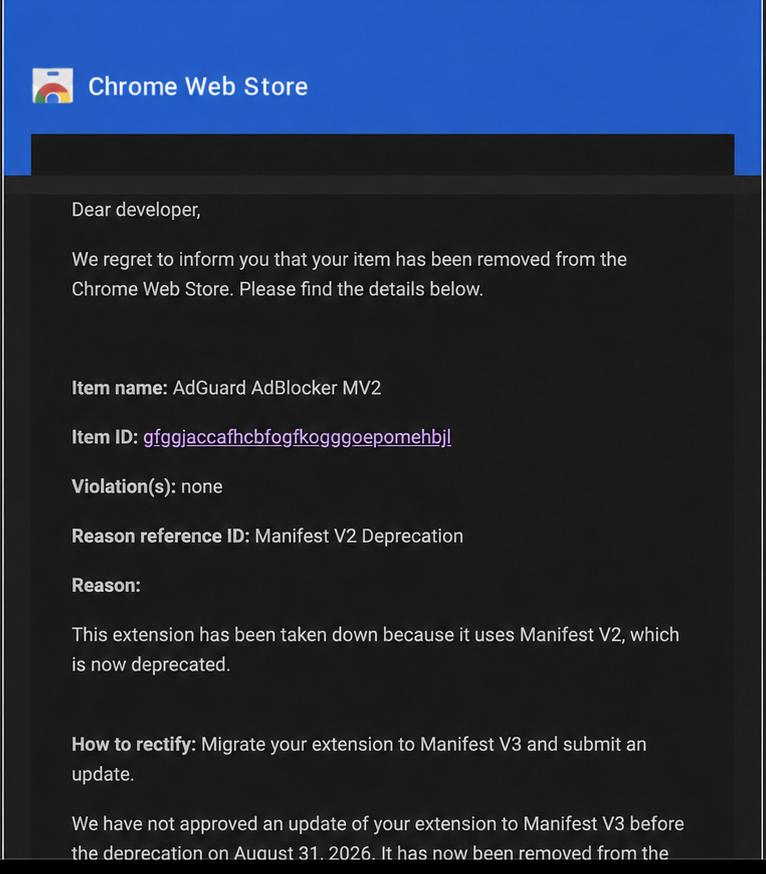
AdGuard is not alone in reaching this point. Chrome has now removed all remaining Manifest V2 extensions from the Chrome Web Store, closing the MV2 era for the entire ecosystem.
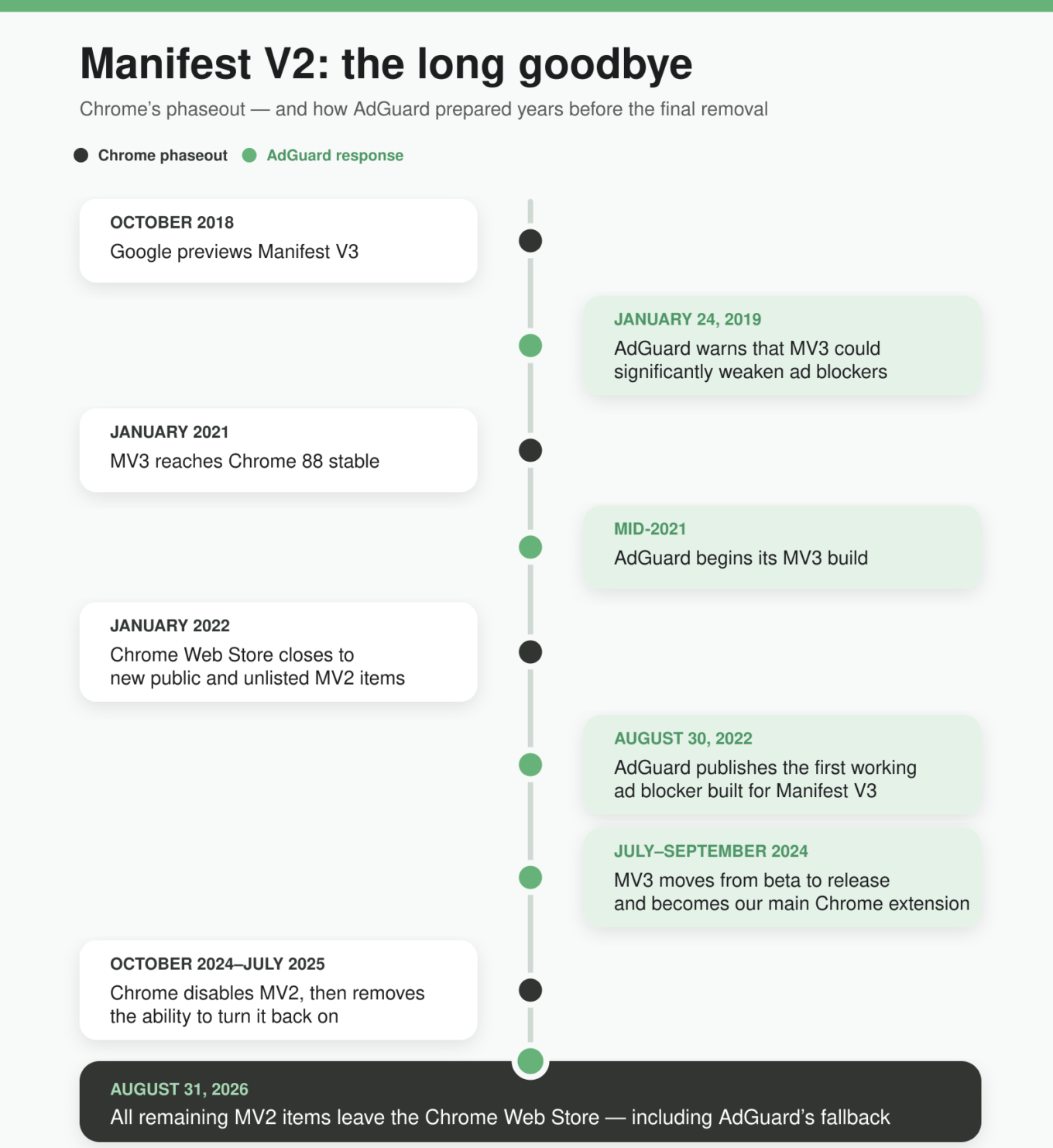
Manifest V2, or MV2, powered Chrome extensions, including some of the most capable ad blockers, for many years. But this final step is neither surprising nor sudden: we have seen it coming for the better part of a decade.
What AdGuard users need to do right now
For most existing AdGuard users in Chrome, the answer is simple: nothing.
Chrome has replaced MV2 with Manifest V3, or MV3 — the platform that Chrome extensions must now use. We rebuilt AdGuard Ad Blocker to work on MV3, and in September 2024, it became our primary Chrome extension. If you installed AdGuard from our Chrome Web Store page and allowed Chrome to update extensions normally, you have already been moved to the MV3 version automatically.
One exception applies to users who installed the separately listed AdGuard Ad Blocker MV2, which we continued to maintain alongside MV3. Because it has a different Chrome Web Store ID, Chrome treats it as a separate extension and cannot automatically replace it with the current MV3 version. If you installed this separate MV2 extension, you now need to install the current AdGuard Ad Blocker manually.
How we got here
Google introduced Manifest V3 in 2018, saying it would make browser extensions safer, more private, and more efficient. The Chrome Web Store did have a real problem with malicious extensions. But from the start, we doubted that MV3 was the right way to solve it.
We never said that Google set out to kill ad blockers. Our point was simpler: restricting every extension does not automatically make users safer, but it does take useful tools away from legitimate privacy extensions. Scam extensions did not disappear after the Chrome Web Store stopped accepting new MV2 submissions. We believed that stricter store moderation and closer cooperation with security experts would protect users more effectively.
Years of criticism and feedback made MV3 much more workable than the original proposal. Chrome added new APIs, raised its rule limits, and paused the phaseout before restarting it. This prevented the worst-case outcome, but it did not make MV3 equal to MV2. Delivering similar protection now takes much more work, and some MV2 capabilities still cannot be reproduced.
MV3 versus MV2: what actually changed?
Under MV2, an ad blocker could inspect each browser request as it happened and decide whether to allow or block it. Under MV3, the extension gives Chrome a list of blocking rules in advance, and Chrome makes most of those decisions itself.
This means the extension needs access to less browsing data, which is one of MV3’s intended privacy benefits. But it also limits what ad blockers can do — something we first warned about in January 2019, when MV3 was still only a proposal.
Under MV3, Chrome limits how many rules and groups of rules can be active at once. Some traditional rules cannot be converted into MV3’s format without losing functionality. Many built-in filtering rules have to be shipped as part of the extension, making urgent updates more difficult. Extension developers also have less freedom to introduce new blocking methods unless the browser’s APIs support them.
Adapting AdGuard required much more than changing a manifest file. We built tools to convert traditional filters into MV3 rules and kept our own engine for hiding ads and other unwanted elements on webpages. We also developed ways to deliver urgent fixes within MV3’s allowance for dynamic rules. More recently, custom filters in MV3 regained the ability to update independently of the extension itself.
For most users, AdGuard should work much as it did before. But MV3 is still a compromise. Providing a level of protection close to what was available under MV2 requires considerably more engineering, and there are still edge cases in which the old extension could do more.
Want to avoid Chrome’s MV3 limits?
Chrome is not the only option. If you want to keep using a full MV2 ad-blocking extension, Firefox continues to support MV2 and the powerful request-blocking mechanism Chrome removed.
Brave also supports a small selection of MV2 extensions, including AdGuard Ad Blocker and uBlock Origin, through its own backend. However, Brave describes this support as best-effort rather than a permanent guarantee.
Even MV2 extensions protect only your browser. For protection that does not depend on any browser’s extension rules, use a system-wide AdGuard app for Windows, Mac, Android, or Linux. It filters traffic across browsers and other applications.