AdGuard for Windows v8.0: a new chapter of protection

The new version is currently in the early stages of rollout and we expect it to reach all existing users in the coming weeks.

A brand-new version, a new major number, a fresh design — and, most importantly, truly system-wide protection. AdGuard for Windows v8.0 doesn’t just look different: it gives you clearer control over the traffic on your computer and makes the most important settings easier to reach.

Ready to check it out? Just update your current app. If you’ve never tried AdGuard for Windows before, get the app by clicking the button below.

If you’d rather read first — here’s why this release is big enough to deserve a new number. There’s something here for power users, and something for those who simply want the clean, safe Internet without having to think about it.

Truly system-wide protection: why we filter all apps

Alongside the DNS filtering you already have, AdGuard offers full-fledged network-level filtering. This means stronger protection and more control: you can filter all Internet traffic on your device, so your protection is system-wide.

You might ask: why does system-wide filtering even matter? Isn’t blocking ads in browsers enough? On desktops, browsers still generate about 55–60% of total traffic — but that still leaves a huge share for other apps. Tracking inside apps is often even more invasive than on websites. Apps can access more personal data, interact directly with device resources, and use persistent identifiers that websites simply can’t. That’s why filtering all device traffic is so important.

Also, our research on popular Windows software showed that a significant share of telemetry and advertising requests comes from desktop apps — messengers, game launchers, media players, PDF readers and others — not just from websites. Many of these apps use the same domains for core functionality and for tracking, so simple domain blocking would break them.

To solve this, v8.0 uses path‑level HTTPS filtering and app‑specific rules that remove tracking requests while keeping the app’s main features intact. Filtering all apps by default ensures that you’re protected everywhere on your system, not only in the browser.

More about how desktop apps track you and why system‑wide filtering matters

🛡️
AdGuard uses a special network driver that handles the actual sending and receiving of data, allowing us to filter traffic from every app on your device.

Of course, DNS protection is still there — you can choose a DNS server and filter content that way. But DNS filtering is less flexible, and some tracking requests can still get through.

This is where HTTPS filtering becomes essential. With it enabled, AdGuard can inspect traffic within Windows apps. This allows us to distinguish between legitimate content and tracking requests, even when they come from the same domain.

For example, you open the Facebook app and just mind your own business. What you can’t see are the tracking requests immediately appearing in the background. The catch is that Facebook serves both legitimate content and tracking requests (like https://graph.facebook.com/network_ads) from the exact same domain. If you try to stop this tracking via DNS, you only have one choice: block the domain entirely. But doing that would break the app completely, meaning you couldn’t even log in or load your feed.
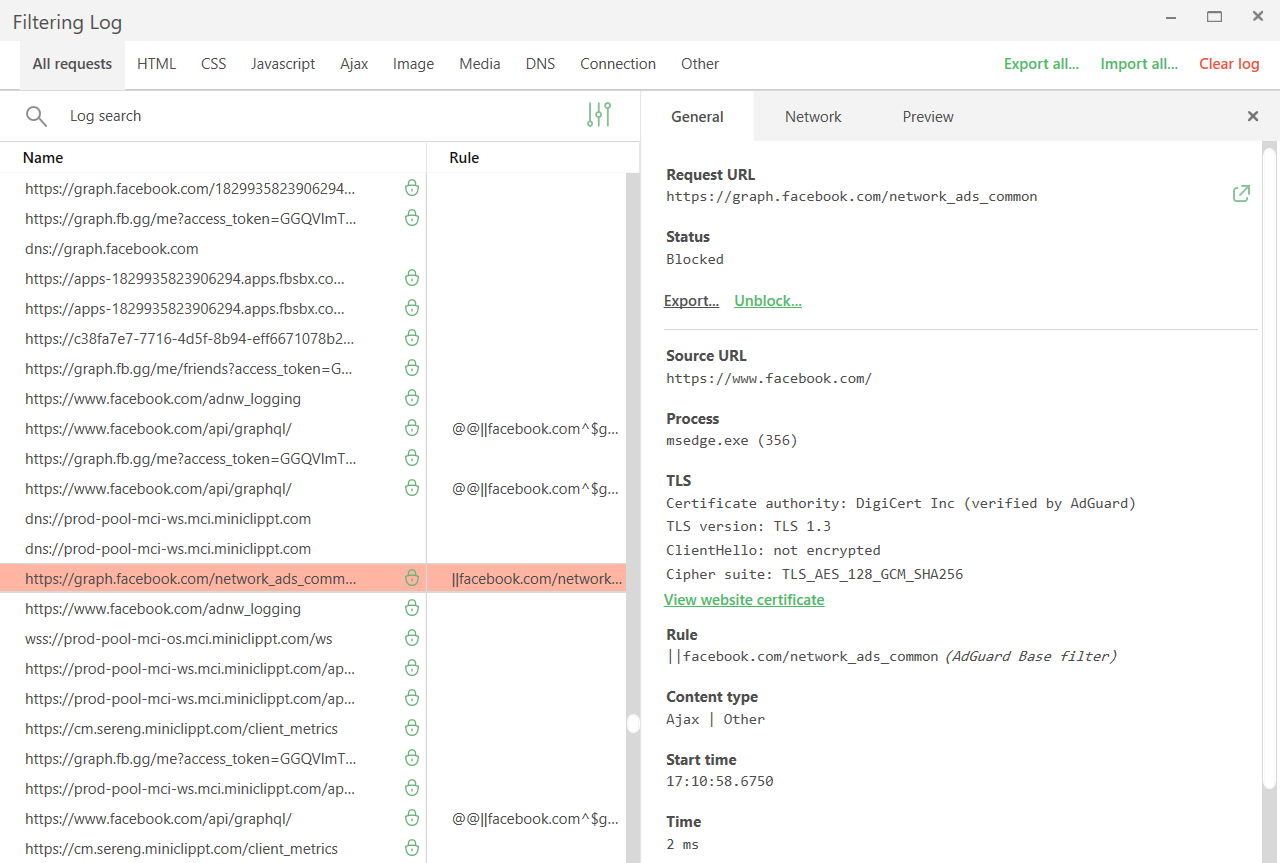
Tracking requests *border

Network filtering lets us be much more precise here. By decrypting the traffic, AdGuard can identify the full URL and block only the tracking requests while leaving the rest of the app working just fine.

While HTTPS filtering is enabled for browsers by default, it is disabled for most other apps to ensure better compatibility. You can always enable it for extra protection: just select the application you want to filter in App management and toggle on Filter HTTPS traffic.
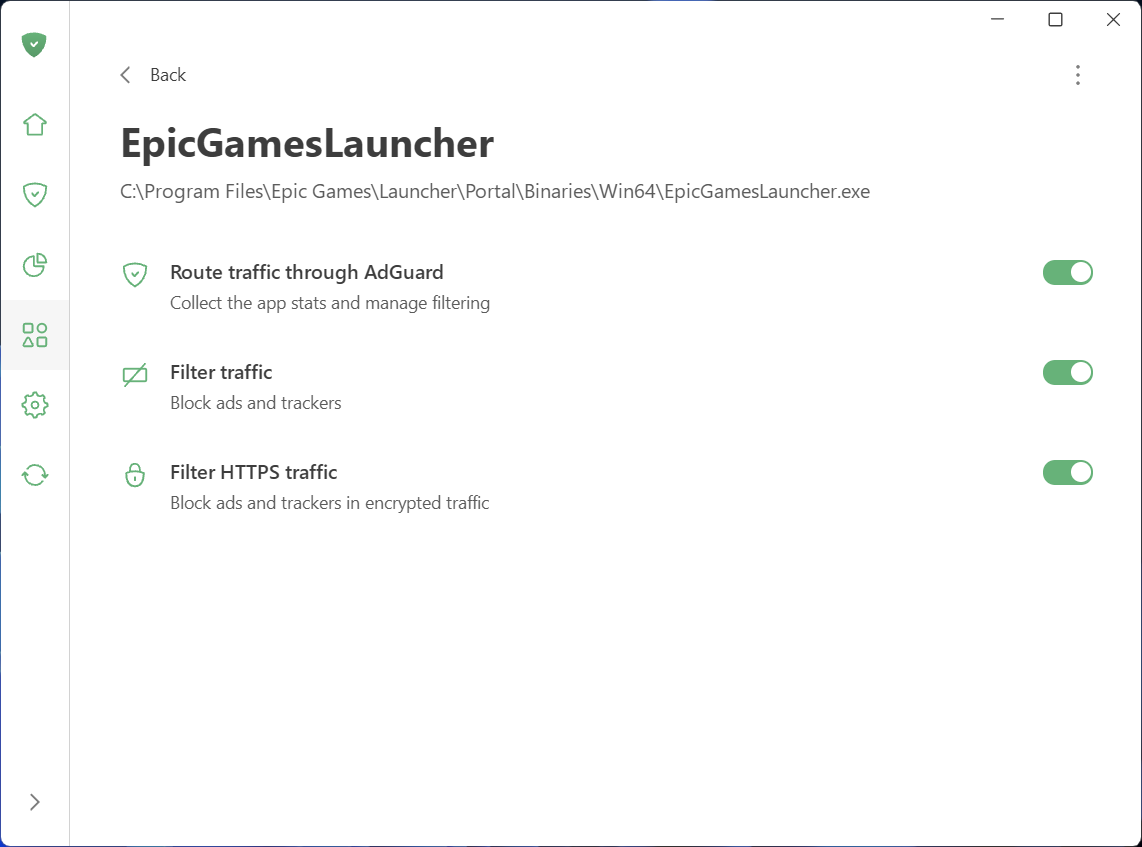
Filter HTTPS traffic

Speaking of App management: this new section, along with Statistics, gives you full control and transparency over what apps are doing on your PC.

See what your apps are doing and take control

To make managing traffic easier and give you a clear picture of what’s happening on your device, we’ve added two new sections: App management and Statistics.

What you can do in App management

App management lets you control how each app accesses the Internet. By default, AdGuard filters everything. As soon as an app goes online, it appears in App management, and its traffic is routed through AdGuard. From there, you can configure what to do with the app and how to filter it:

  • Decide which apps have their traffic routed through AdGuard
  • Choose to block ads and trackers in specific apps
  • Enable HTTPS filtering in apps of your choice
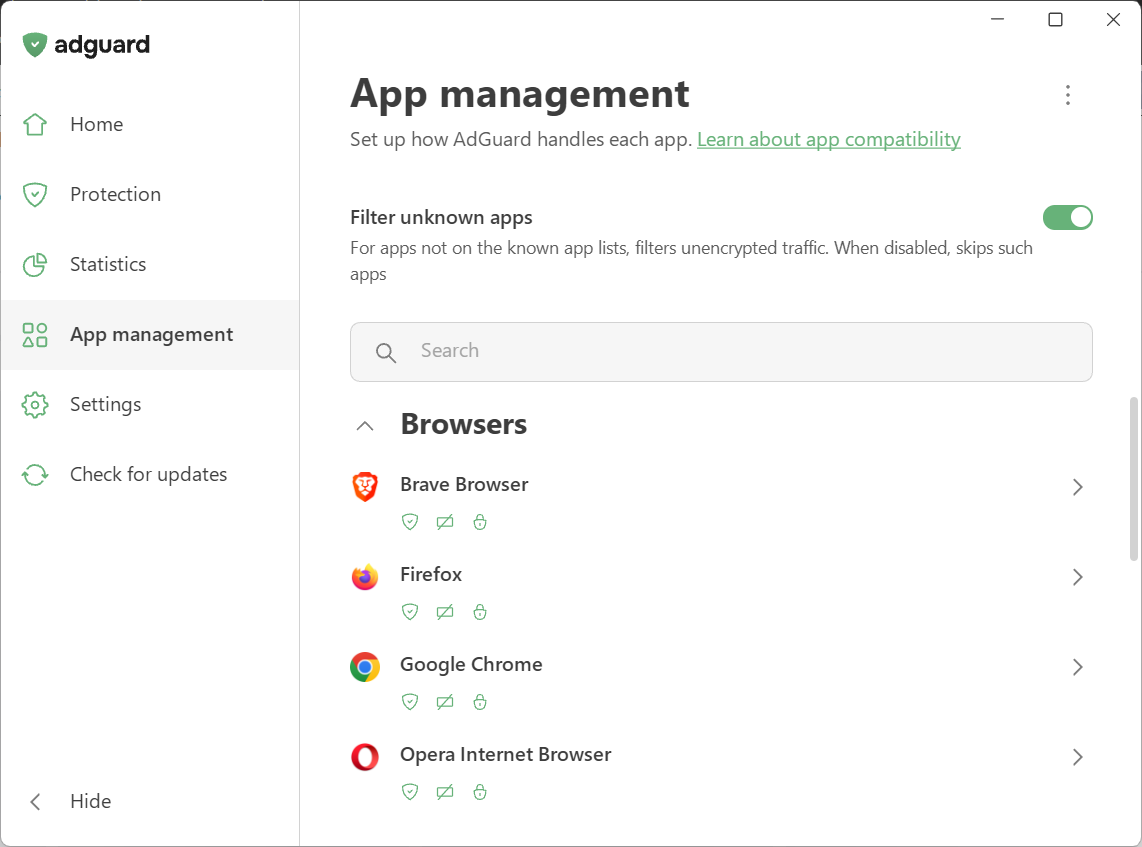
App management

We’ve also introduced Filter unknown apps, a new setting for handling apps that are not yet in the compatibility or exclusion lists. It’s on by default — new apps get regular filtering, while HTTPS interception stays off to avoid affecting app behavior. Read our Knowledge Base article for more details.

What you can see in Statistics

Statistics show detailed network activity. The Companies section provides a perspective on all the companies that your device has sent requests to, while in Apps and Domains you see the stats specific traffic data for every app routed through AdGuard.
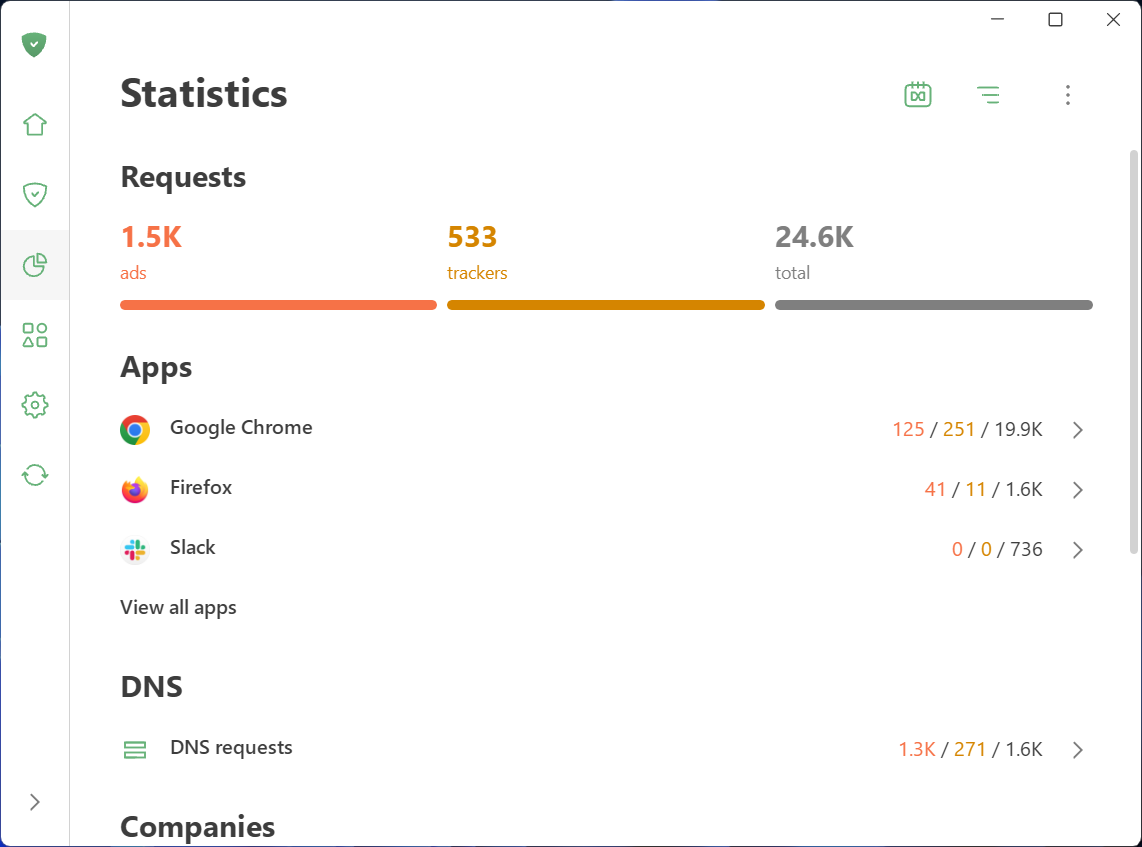
Statistics

Wondering which company’s requests are blocked most often? Which apps are trying to share your data and with whom? You can quickly identify and block anything suspicious.

Not only inside updates: A complete redesign

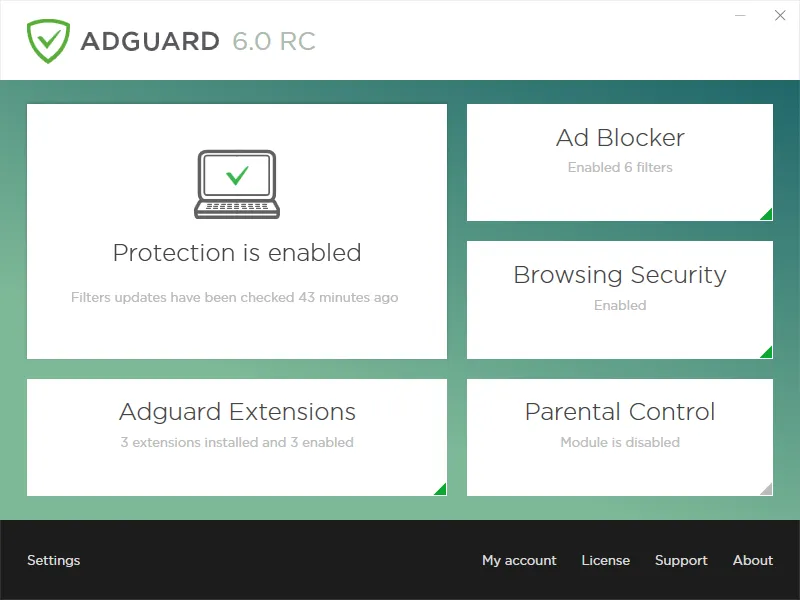
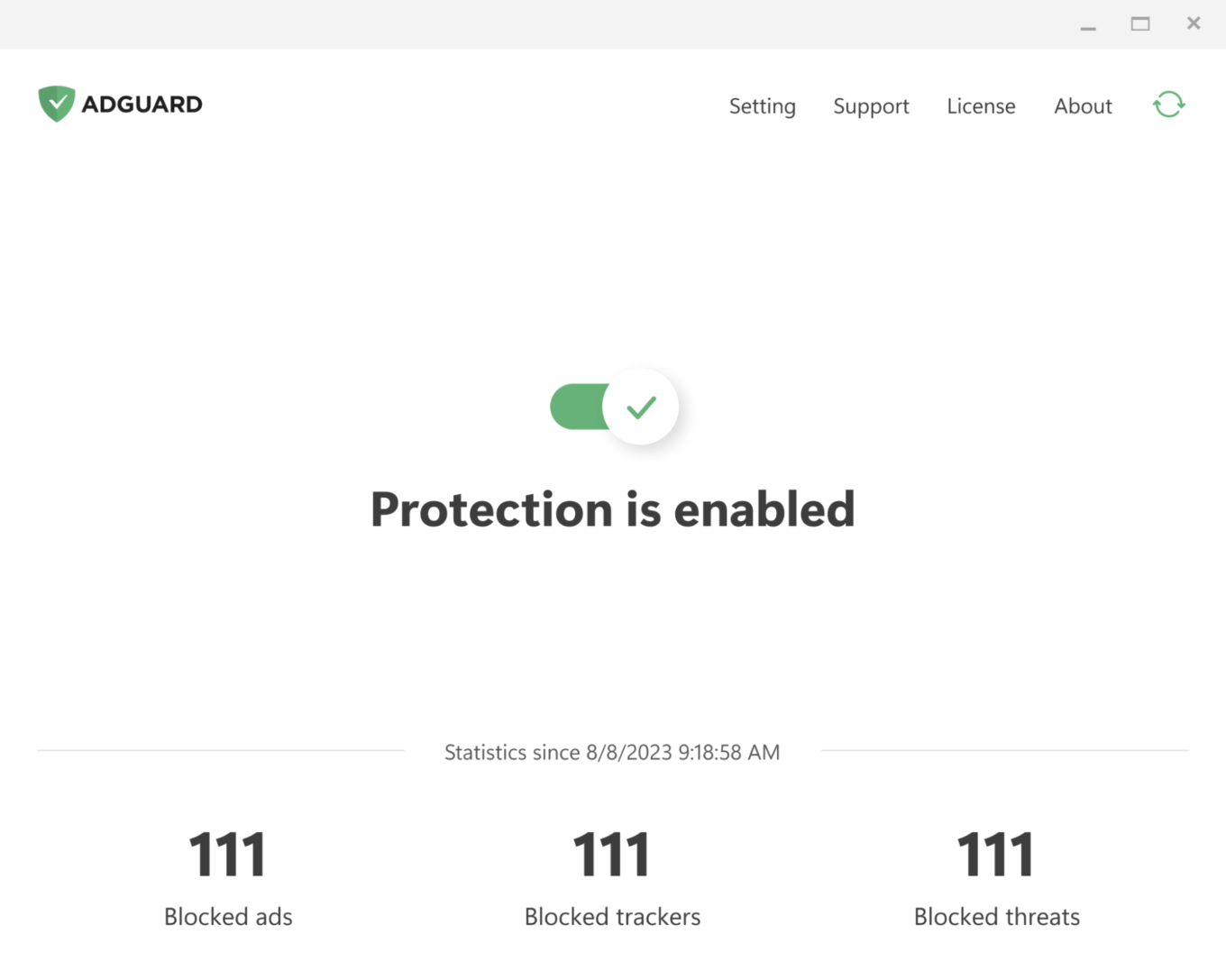
AdGuard for Windows has come a long way since its debut in 2009. Over the past 16 years, its interface has shifted alongside the changing web, evolving through versions 5, 6, and 7. For those who have been with us from the start, these might bring back some memories:
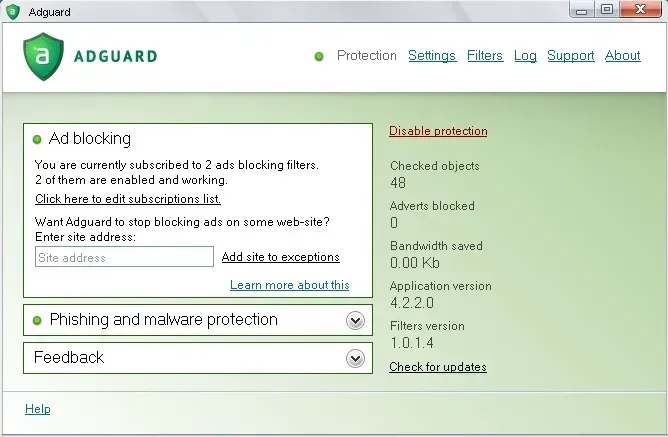
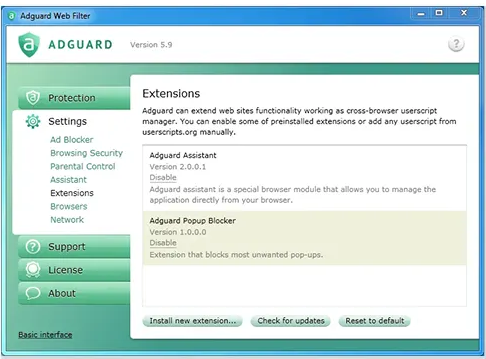
With version 8.0, we are opening a whole new chapter. The app has been completely redesigned from scratch. Our focus was on simplicity and ease of use. The most important tools are now front and center, while advanced settings are still available — just tucked away so they don’t overwhelm new users.

Let’s start with the basics and dive deeper the further we go.

Key settings in plain sight

The app is designed to let you enable everything you need straight from the first screen. Just click the symbols you see — they stand for blocking ads and trackers, handling cookie notices and similar annoyances, and DNS protection. Everything you need for smooth and secure browsing.
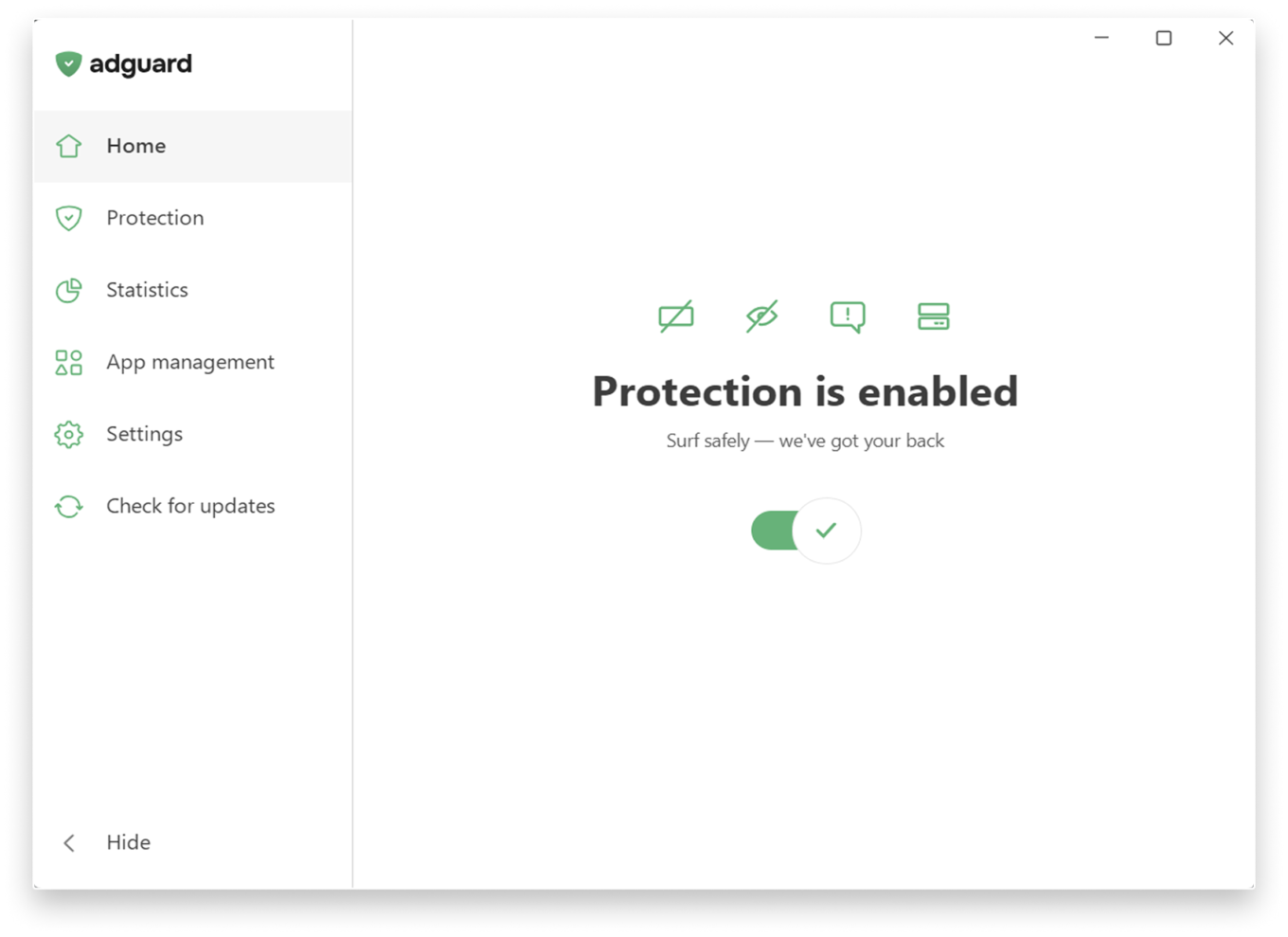
Main screen

If you want to fine-tune your protection, head to the Protection section, where settings are clearly categorized and explained in simple terms and enabled by one toggle.
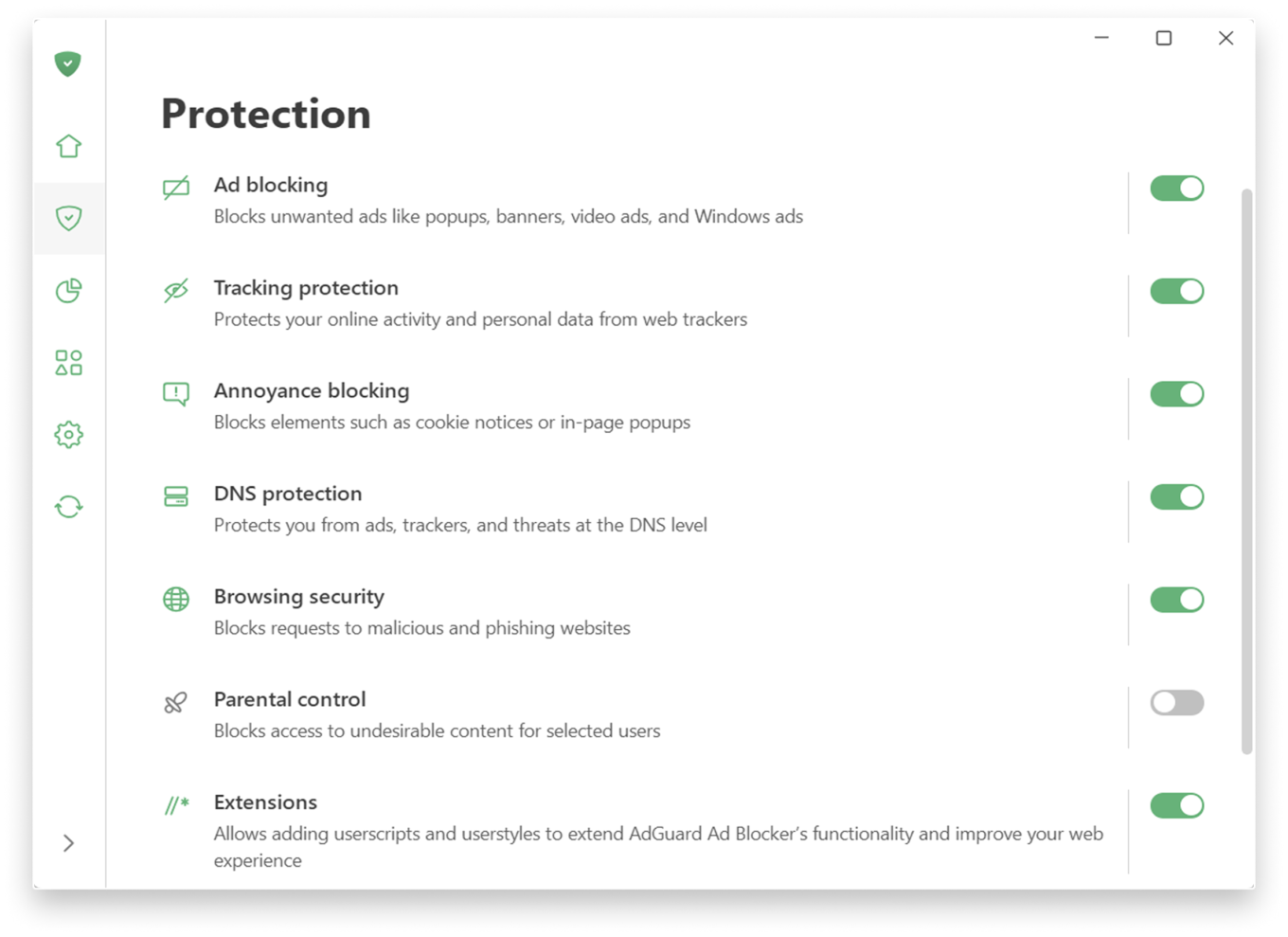
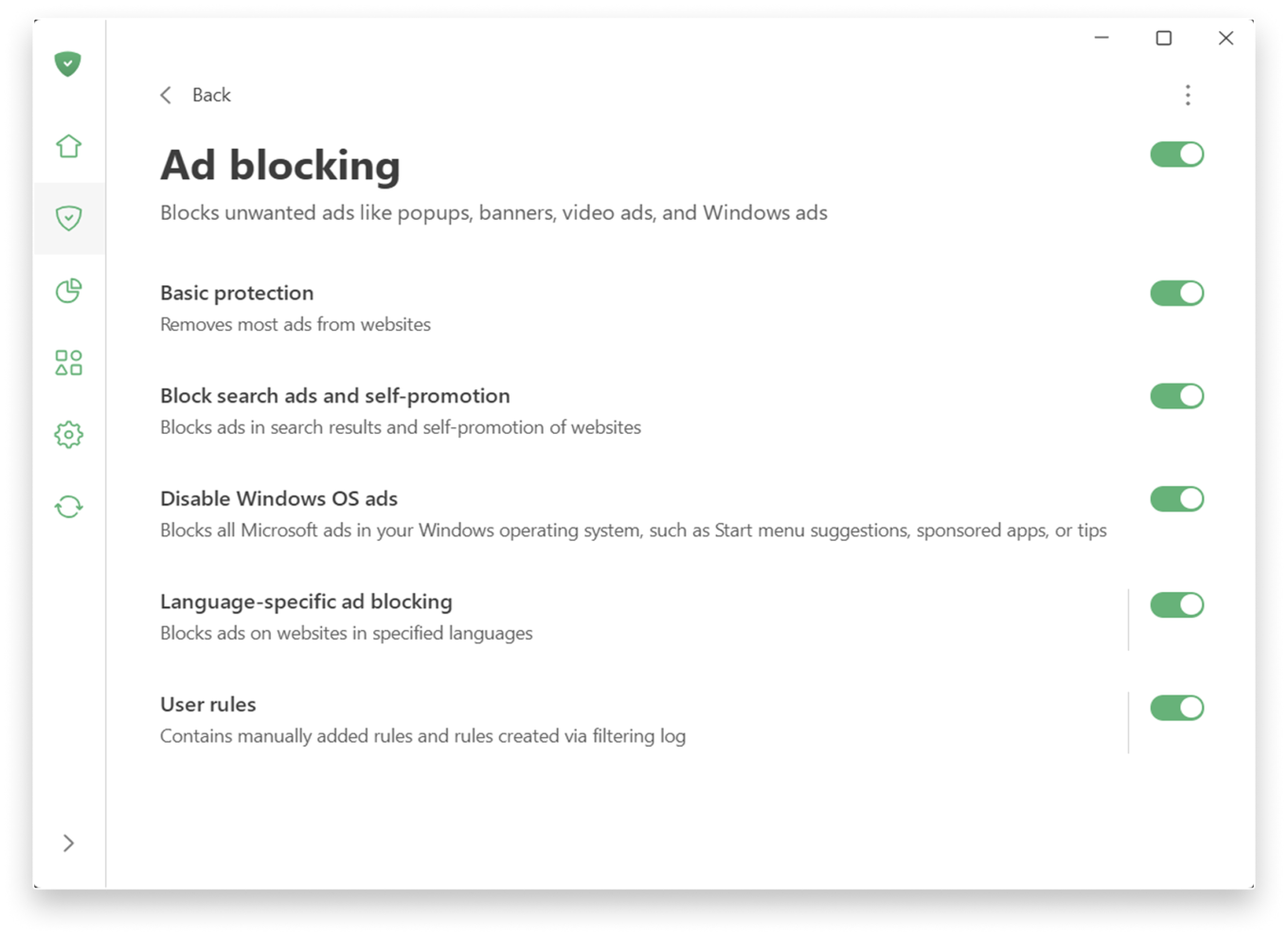
If you prefer a more personalized experience, adjust the settings further.

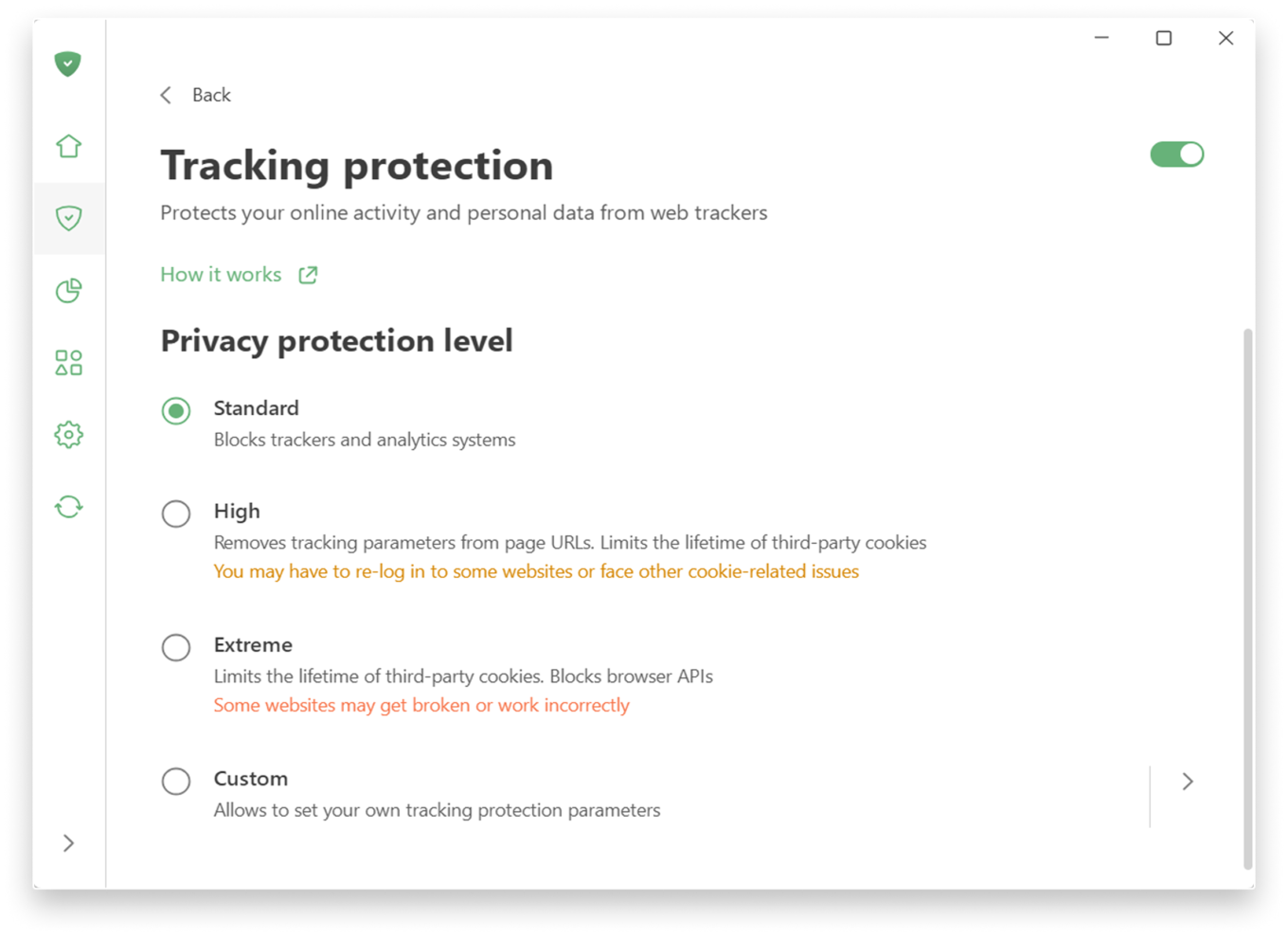
Tracking protection allows you to choose a level of protection — from a simple, comfortable experience to a more advanced one, which includes deleting cookies for enhanced privacy. There is also a custom level where you can freely fine-tune everything to suit your preferences: like blocking notifications from websites or enabling anti-DPI protection.
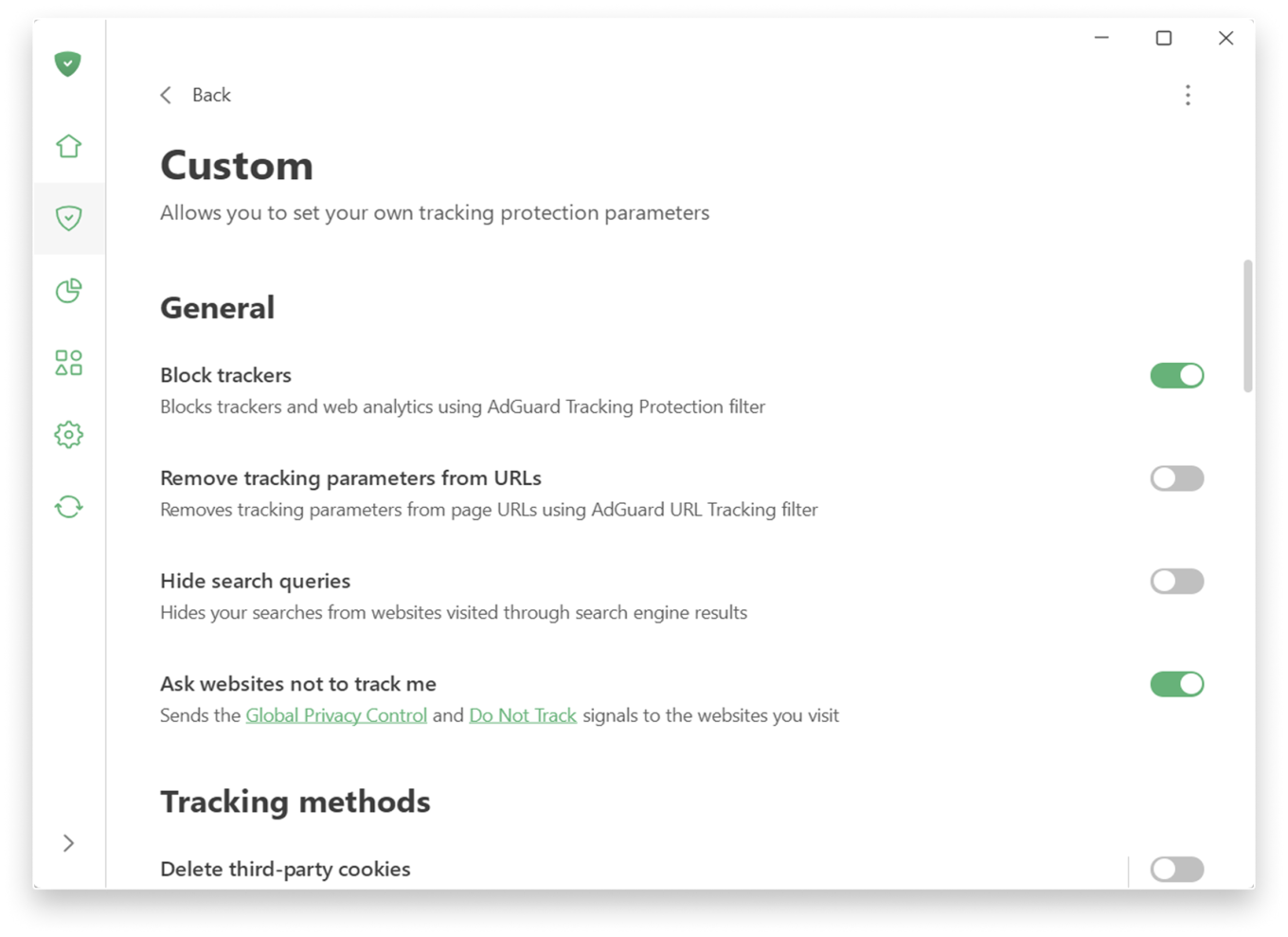
Custom level

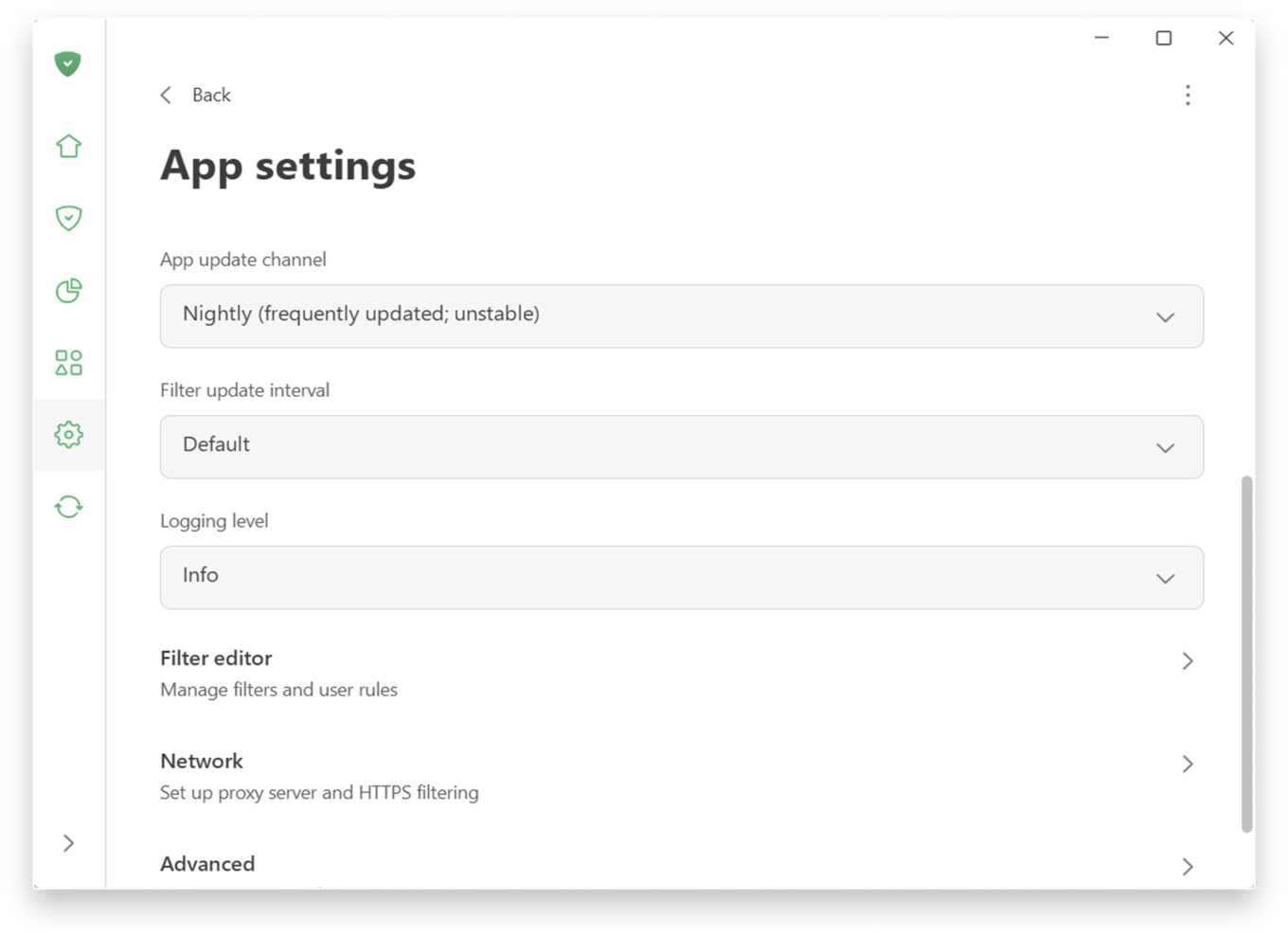
Prefer a more hands-on approach to filtering? You can find low-level and network settings in SettingsApp settings.

App settings

📚
For more details on new features, check the Knowledge Base. If you’re using an older version, there is a separate section.

Extensive testing and how we handle compatibility issues

Before releasing 8.0 we ran extensive internal testing on hundreds of applications, and the public beta program lasted more than six months. Our goal was to make sure that popular apps work correctly with the new filtering logic out of the box, without manual configuration.

In most cases, widely used applications should work normally after the upgrade. However, the Windows ecosystem is huge, and some apps or specific configurations can still cause edge cases.

If you encounter a broken app or unexpected behavior after upgrading to v8.0, please report it immediately via our GitHub repo or through support in the app. We treat such reports as high priority and will react quickly with hotfixes. Your feedback directly improves the compatibility lists that control how each app is filtered and routed.


Vam je bila objava všeč?
AdGuard VPN AdGuard DNS AdGuard Mail AdGuard Wallet
Glavni zaslon AdGuard za Windows
Zaslon zaščite AdGuard za Windows, ki prikazuje funkcije zaščite in nastavitve
Zaslon statistike AdGuard za Windows, ki prikazuje statistiko blokiranih oglasov in sledilcev
Zaslon Upravljanje aplikacij AdGuard za Windows, ki prikazuje možnosti upravljanja zaščite za aplikacije, nameščene v napravi
20.275 20275 ocen uporabnikov
Odlično!

AdGuard: blokator oglasov za Windows

AdGuard za Windows je več kot blokator oglasov. Je večnamensko orodje, ki blokira oglase, nadzoruje dostop do nevarnih spletnih mest, pospeši nalaganje strani in ščiti otroke pred neprimerno vsebino
S prenosom programa sprejemate pogoje Licenčne pogodbe
Microsoft Trgovina
S prenosom programa sprejemate pogoje Licenčne pogodbe
AdGuard za Windows v8.0, 14-dnevno preizkusno obdobje
Glavni zaslon AdGuard za Mac
Zaslon Prikritega načina AdGuard for Mac
20.275 20275 ocen uporabnikov
Odlično!

AdGuard: blokator oglasov za Mac

AdGuard za Mac je edinstven blokator oglasov, zasnovan z mislijo na macOS. Poleg zaščite pred nadležnimi oglasi v brskalnikih in aplikacijah vas ščiti pred sledenjem, lažnim predstavljanjem in goljufijami
S prenosom programa sprejemate pogoje Licenčne pogodbe
Več o tem
AdGuard za macOS v2.19, 14-dnevno preizkusno obdobje
Glavni zaslon AdGuard za Android
Zaslon Zaščita pred sledenjem AdGuard za Android
Zaslon Upravljanje aplikacij AdGuard za Android, ki prikazuje možnosti upravljanja zaščite za aplikacije, nameščene v napravi
Zaslon statistike AdGuard za Android, ki prikazuje statistiko blokiranih oglasov in sledilcev
Glavni zaslon zasebnega brskalnika AdGuard za Android
QR koda za prenos AdGuard za Android
20.275 20275 ocen uporabnikov
Odlično!

AdGuard: blokator oglasov za Android

Blokira oglase in sledilnike v vseh brskalnikih, igrah in drugih aplikacijah. Ščiti vašo zasebnost in vam omogoča nadzor nad tem, kako vaše aplikacije uporabljajo internet. Nameščeno prek APK-ja
S prenosom programa sprejemate pogoje Licenčne pogodbe
Več o tem
Preglejte za prenos
Uporabite kateri koli razpoložljivi bralnik QR kod v vaši napravi
AdGuard za Android v4.14, 14-dnevno preizkusno obdobje
Glavni zaslon AdGuard za iOS
Zaslon zaščite AdGuard za iOS, ki prikazuje funkcije zaščite in nastavitve
Zaslon statistike AdGuard za iOS, ki prikazuje statistiko blokiranih oglasov in sledilcev
QR koda za prenos AdGuard za iOS
20.275 20275 ocen uporabnikov
Odlično!

AdGuard: blokator oglasov za iOS

Najboljši blokator oglasov za iOS za iPhone in iPad. AdGuard odstrani vse vrste oglasov in sledilnikov v Safariju ter ščiti vašo zasebnost v vseh aplikacijah na ravni DNS

S prenosom programa sprejemate pogoje Licenčne pogodbe
Več o tem
Preglejte za prenos
Uporabite kateri koli razpoložljivi bralnik QR kod v vaši napravi
AdGuard za iOS v4.5
Glavni zaslon AdGuard Content Blocker
Zaslon filtri AdGuard Content Blocker
Zaslon nastavitve AdGuard Content Blocker
20.275 20275 ocen uporabnikov
Odlično!

AdGuard Zaviralec vsebine

AdGuard Content Blocker odpravlja vse vrste oglasov v mobilnih brskalnikih, ki podpirajo tehnologijo blokiranja vsebine — in sicer Samsung Internet in Yandex Browser. Njegove funkcije so omejene v primerjavi z AdGuardom za Android, vendar je brezplačen, enostaven za namestitev in učinkovit

S prenosom programa sprejemate pogoje Licenčne pogodbe
Več o tem
AdGuard Zaviralec vsebine v2.8
Glavni zaslon razširitev brskalnika AdGuard
Zaslon Zaščita pred sledenjem razširitve brskalnika AdGuard
20.275 20275 ocen uporabnikov
Odlično!

AdGuard Razširitev brskalnika

AdGuard je najhitrejša in najlažja razširitev za zaviranje oglasov, ki učinkovito onemogoča vse vrste oglasov na vseh spletnih straneh! Za brskalnik, ki ga uporabljate, izberite AdGuard in hitro ter varno brskajte brez oglasov.
Namesti
S prenosom programa sprejemate pogoje Licenčne pogodbe
Namesti
S prenosom programa sprejemate pogoje Licenčne pogodbe
Namesti
S prenosom programa sprejemate pogoje Licenčne pogodbe
Namesti
S prenosom programa sprejemate pogoje Licenčne pogodbe
Namesti
S prenosom programa sprejemate pogoje Licenčne pogodbe
Več o tem
Namesti
S prenosom programa sprejemate pogoje Licenčne pogodbe
Več o tem
AdGuard Razširitev brskalnika v5.5
Glavni zaslon Pomočnik brskalnika
20.275 20275 ocen uporabnikov
Odlično!

AdGuard Pomočnik

Sopodajalna razširitev za brskalnik za AdGuard namizne aplikacije. Dovoli vam, da blokirate po meri nastavljene elemente na spletnih straneh, dodajate spletne strani na seznam dovoljenih in pošiljate poročila neposredno iz vašega brskalnika
AdGuard Pomočnik v1.4
20.275 20275 ocen uporabnikov
Odlično!

AdGuard Home

AdGuard Home je omrežna rešitev za blokiranje oglasov in sledilcev. Namestite ga enkrat na usmerjevalnik, da pokrijete vse naprave v domačem omrežju — dodatna programska oprema odjemalca ni potrebna. To je še posebej pomembno za različne naprave IoT, ki pogosto ogrožajo vašo zasebnost
AdGuard Home v0.107
Glavni zaslon AdGuard Pro za iOS
Zaslon zaščite AdGuard Pro za iOS, ki prikazuje funkcije zaščite in nastavitve
Zaslon statistike AdGuard Pro za iOS, ki prikazuje statistiko za blokirane oglase in sledilce
20.275 20275 ocen uporabnikov
Odlično!

AdGuard Pro za iOS

AdGuard Pro za iOS vključuje vse napredne funkcije zaščite pred oglasi z omogočeno blokado. Ponuja ista orodja kot plačljiva različica AdGuard za iOS. Odličen je pri blokiranju oglasov v Safari in omogoča prilagajanje DNS nastavitev za prilagojeno zaščito. Oglase blokira v brskalnikih in aplikacijah, vaše otroke ščiti pred neprimerno vsebino ter ohranja vaše osebne podatke varne.
S prenosom programa sprejemate pogoje Licenčne pogodbe
Več o tem
AdGuard Pro za iOS v4.5
Glavni zaslon AdGuard Mini za Mac
Zaslon zaščite Safari v AdGuard Mini za Mac
Zaslon ustvarjanja pravila AdGuard Mini za Mac
20.275 20275 ocen uporabnikov
Odlično!

AdGuard Mini za Mac — zaviralec oglasov Safari

AdGuard Mini za Mac je zmogljiv Safari blokator oglasov. Ta lahka aplikacija odstranjuje oglase, blokira sledilce in pospešuje nalaganje strani. Pomaga vam brskati po spletu v Safariju brez motenj in varuje vaše podatke
Namesti
S prenosom programa sprejemate pogoje Licenčne pogodbe
Več o tem
AdGuard Mini za Mac v2.3
Glavni zaslon AdGuard za Android TV z omogočeno zaščito
Zaslon blokiranja oglasov AdGuard za Android TV, ki prikazuje njegove funkcije in nastavitve
Zaslon nastavitev AdGuard za Android TV
Zaslon Upravljanje aplikacij AdGuard za Android TV, ki prikazuje aplikacije, kjer so oglasi in sledilci blokirani
20.275 20275 ocen uporabnikov
Odlično!

AdGuard za Android TV

AdGuard za Android TV je edina aplikacija, ki zavira oglase, varuje vašo zasebnost in deluje kot požarni zid za vaš Smart TV. Prejmite opozorila o spletnih grožnjah, uporabite varen DNS in izkoristite šifriran promet. Sprostite se in se potopite v svoje najljubše oddaje z vrhunsko varnostjo in brez oglasov!
AdGuard za Android TV v4.14, 14-dnevno preizkusno obdobje
Maskota AdGuard, Agnar, ki drži Linux pingvina
20.275 20275 ocen uporabnikov
Odlično!

AdGuard za Linux

AdGuard za Linux je prvi sistemski zaviralec oglasov za Linux na svetu. Onemogočite oglase in sledilce na ravni naprave, izberite med vnaprej nameščenimi filtri ali dodajte svoje — vse preko ukazne lupine vmesnika
AdGuard za Linux v1.4
20.275 20275 ocen uporabnikov
Odlično!

AdGuard Temp Mail

Brezplačen ustvarjalec začasnih elektronskih naslovov, ki vas ohranja anonimne in ščiti vašo zasebnost. Brez neželene pošte v vašem glavnem predalu!
20.275 20275 ocen uporabnikov
Odlično!

AdGuard VPN

75 lokacij svetovnega spleta

Dostop do katere koli vsebine

Močno šifriranje

Politika 'Brez dnevnikov'

Najhitrejša povezava

stalna podpora

Poskusite brezplačno
S prenosom programa sprejemate pogoje Licenčne pogodbe
Več o tem
20.275 20275 ocen uporabnikov
Odlično!

AdGuard DNS

AdGuard DNS je brezhiben način zaviranja internetnih oglasov, ki ne zahteva nameščanja nobenih aplikacij. Je preprost za uporabo, popolnoma brezplačen, enostavno nastavljiv na kateri koli napravi in vam zagotavlja minimalne potrebne funkcije za zaviranje oglasov, števcev, zlonamernih spletnih strani in vsebine za odrasle.
20.275 20275 ocen uporabnikov
Odlično!

AdGuard Mail

Ščitite svoj identitet, izogibajte se neželeni pošti in ohranite svoj nabiralnik varno z našimi vzdevki in začasnimi e-poštnimi naslovi. Uživajte v naši brezplačni storitvi posredovanja e-pošte in aplikacijah za vse operacijske sisteme
20.275 20275 ocen uporabnikov
Odlično!

AdGuard Wallet

Varna in zasebna kripto denarnica, ki vam omogoča popoln nadzor nad vašimi sredstvi. Upravljaj več denarnic in odkrij tisoče kriptovalut za shranjevanje, pošiljanje in zamenjavo
Prenos AdGuarda Za namestitev AdGuarda kliknite gumb, označen s puščico Izberite 'Odpri' in kliknite na 'Vredu', nato pa počakajte, da se datoteka prenese. V odprtem oknu povlecite ikono AdGuarda in jo spustite v mapo 'Aplikacije'. Hvala, ker ste izbrali AdGuard! Izberite 'Odpri' in kliknite na 'Vredu', nato pa počakajte, da se datoteka prenese. V odprtem oknu kliknite na 'Namesti'. Hvala, ker ste izbrali AdGuard!
Namestite AdGuard na svojo mobilno napravo